🌴 GoHighLevel Summer Promo is LIVE -  Save 50% All Plans  +  Free AI Tools  Ends June 28. → Full Details

How GoHighLevel’s AI Tools Work Together to Attract, Engage, Convert, and Automate Your Business

How GoHighLevel’s AI Tools Work Together to Attract, Engage, Convert, and Automate Your Business
How GoHighLevel AI Tools Work Together

Artificial intelligence is becoming one of the biggest selling points inside GoHighLevel. But many business owners and agencies still struggle to understand how all the AI tools fit together.

They see AI Studio, Conversation AI, Voice AI, AI Employees, workflows, and CRM automation listed throughout the platform and wonder:

“Do I need all of these?”

The answer is that each tool solves a different part of the customer journey.

Understanding GoHighLevel AI Tools doesn’t have to be complicated. The easiest way to understand how GoHighLevel AI works is to map each tool to the role it plays in your business.

Rather than thinking about them as separate features, it’s easier to view them as a connected system designed to help you attract leads, engage prospects, convert opportunities, and automate follow-up.

Here’s how the entire GoHighLevel AI ecosystem works together.

Table of Contents

Want to See These AI Tools in Action?

The best way to understand how GoHighLevel’s AI tools work together is to experience them inside a live account.

GoHighLevel gives you access to AI Studio, Conversation AI, Voice AI, CRM automation, workflows, and AI Employees from a single platform.

You can explore the platform, build funnels, test AI conversations, and see how the entire ecosystem connects before making a commitment.

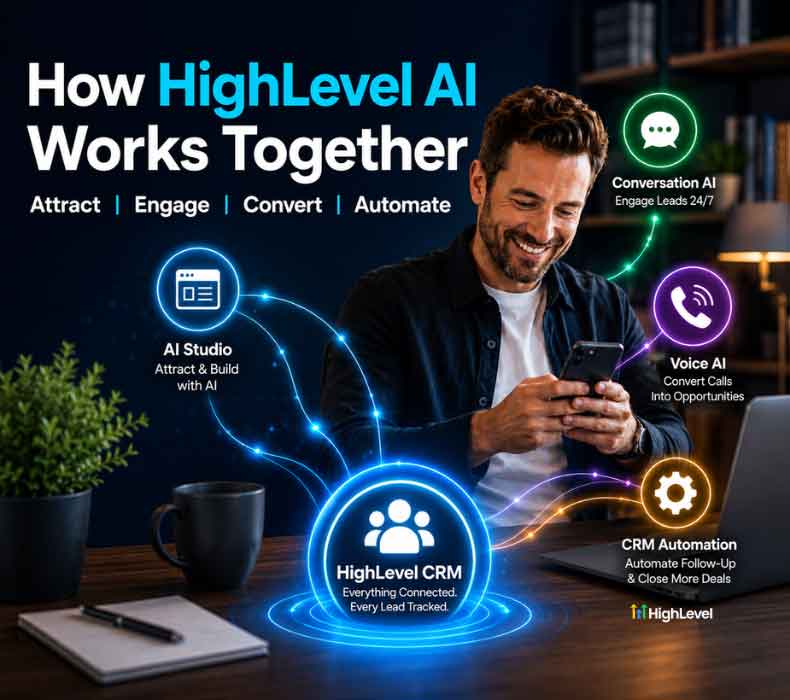
How GoHighLevel AI Tools Work Together Across the Customer Journey

Stage AI Tool What It Does
Attract & Build AI Studio Builds websites, landing pages, and funnels from prompts so you launch faster
Engage Conversation AI Handles incoming messages 24/7 across SMS, social, and chat
Convert Voice AI Answers inbound calls, qualifies leads, and captures opportunities
Automate Workflow AI + CRM Connects contacts, pipelines, automations, and follow-up

AI Studio builds the experience. Conversation AI handles the messages. Voice AI handles the calls. Everything connects back to HighLevel’s CRM and automations.

Worth noting if you’re an agency: this is also the framework you can use when explaining the AI tools to clients. Each stage maps directly to a problem they already know they have.

Stage 1: Attract and Build with AI Studio

Every customer journey starts with visibility.

Before leads can call, text, or book appointments, they need somewhere to land.

That’s where GoHighLevel AI Studio comes in.

AI Studio allows users to generate websites, funnels, landing pages, and marketing assets using simple prompts. Instead of spending hours building pages manually, businesses can describe what they want and let AI generate a working draft.

For agencies, this can dramatically reduce build times and improve speed-to-launch for new clients.

Examples include:

•  Lead generation websites

•  Appointment booking funnels

•  Service pages

•  Landing pages for paid ads

•  Local business websites

•  Multi-page company websites

The goal of AI Studio is simple: get your digital presence online faster so leads can start entering your pipeline.

If you’d like a deeper look at how the platform works, read our complete guide:

What Happens Next?

Once someone visits your website or funnel, they inevitably have questions.

This is where most businesses lose momentum.

If nobody responds quickly, prospects leave.

That’s where Conversation AI enters the process.

Stage 2: Engage Leads with Conversation AI

Conversation AI acts as your 24/7 front-line messaging assistant.

Instead of waiting for a human to respond, prospects receive immediate answers regardless of the time of day.

Conversation AI can engage visitors across:

•  Website chat widgets

•  SMS messages

•  Facebook Messenger

•  Instagram messaging

•  Other integrated communication channels

The AI can:

•  Answer common questions

•  Qualify leads

•  Collect contact information

•  Provide pricing information

•  Direct users to booking pages

•  Escalate conversations when needed

For many businesses, speed-to-lead is one of the biggest factors affecting conversion rates.

A prospect who receives an instant response is far more likely to continue the conversation than one who waits several hours.

Example

Imagine a prospect visits your website at 10:47 PM and asks:

“Do you offer emergency HVAC service?”

Rather than waiting until morning, Conversation AI can immediately:

1. Confirm services offered

2. Gather contact information

3. Ask qualifying questions

4. Offer appointment scheduling

By the time your team logs in the next morning, the lead has already been engaged and qualified.

Learn more in our detailed guide:

What Happens When Someone Calls?

Not every prospect wants to text.

Many buyers still prefer picking up the phone.

That’s where Voice AI becomes critical.

Stage 3: Convert Opportunities with Voice AI

Phone calls often represent the highest-intent leads a business receives.

The problem?

Many businesses miss calls due to:

•  After-hours inquiries

•  Busy staff

•  Limited office coverage

•  Multiple incoming calls

Every missed call can mean a lost customer.

GoHighLevel Voice AI helps solve this by answering inbound calls automatically.

Voice AI can:

•  Answer calls 24/7

•  Respond naturally using AI-generated speech

•  Ask qualifying questions

•  Capture lead information

•  Schedule appointments

•  Route calls to the appropriate person

•  Log conversations inside the CRM

Example Workflow

A prospect calls your business after hours.

Instead of hearing voicemail, Voice AI:

1. Answers immediately

2. Asks what service they’re looking for

3. Collects contact details

4. Qualifies the lead

5. Books an appointment

6. Creates a CRM record

The next day, your team has a complete conversation history waiting inside HighLevel.

This creates a significantly better customer experience while ensuring opportunities aren’t lost.

For a complete breakdown, see:

Stage 4: Automate Everything Through the CRM

This is where the real power of GoHighLevel becomes apparent.

AI Studio, Conversation AI, and Voice AI don’t operate independently.

Everything feeds back into the HighLevel CRM.

Every interaction becomes structured customer data.

This includes:

•  Contact records

•  Call transcripts

•  Chat conversations

•  Lead qualification answers

•  Appointment bookings

•  Pipeline stages

•  Customer tags

Once information enters the CRM, workflows can automatically take action.

Examples include:

•  Sending appointment reminders

•  Triggering follow-up SMS campaigns

•  Creating internal notifications

•  Moving opportunities through pipelines

•  Assigning leads to team members

•  Launching nurture campaigns

Instead of manually managing every interaction, the CRM acts as the central command center for your entire customer journey.

➡️ What is GoHighLevel?

Ready to Test the Complete AI Ecosystem?

Reading about GoHighLevel’s AI tools is one thing. Seeing them work inside your own business is another.

With a free 30-day trial, you can:

•  Build websites and funnels with AI Studio

•  Test Conversation AI on your website

•  Configure Voice AI call handling

•  Create CRM automations and workflows

•  Explore AI Employees firsthand

➡️ Claim Your Free 30-Day GoHighLevel Trial

Where AI Employees Fit Into the Picture

Many users hear the term “AI Employee” and assume it’s another standalone product.

In reality, AI Employees are often the practical implementation of the AI tools discussed above.

An AI Employee may combine:

•  Conversation AI

•  Voice AI

•  CRM automation

•  Workflow automation

Together, these tools perform tasks that traditionally required human staff.

For example, an AI Employee can:

•  Answer missed calls

•  Respond to inquiries

•  Qualify prospects

•  Book appointments

•  Follow up automatically

•  Update CRM records

This is why GoHighLevel positions AI Employees as virtual team members rather than simple AI features.

To learn more, read:

Understanding AI Employee Plans

As businesses begin implementing multiple AI tools, one of the most common questions becomes:

Which AI Employee plan should I choose?

GoHighLevel currently offers multiple AI Employee pricing tiers, including:

•  Pay As You Go

•  AI Employee Growth

•  AI Employee Unlimited

The right choice depends on:

•  Monthly call volume

•  Messaging volume

•  Number of clients

•  Agency usage requirements

•  Automation complexity

We break down the differences, pricing considerations, and ideal use cases in our full guide:

Visualizing the Entire GoHighLevel AI Ecosystem

How GoHighLevel AI Tools Work Together

AI Studio
    ↓
Website / Funnel
    ↓
Conversation AI
(Chat, SMS, Social)
    ↓
Voice AI
(Phone Calls)
    ↓
Lead Qualification
    ↓
CRM Contact Record
    ↓
Workflows & Automations
    ↓
Appointment Booking
    ↓
Customer Follow-Up
    ↓
Revenue

Every tool serves a specific purpose, but all roads lead back to the CRM.

That’s what makes GoHighLevel different from standalone AI products that operate in isolation.

Why Agencies Should Explain AI This Way

For agencies selling GoHighLevel services, this framework simplifies client conversations.

Instead of overwhelming prospects with product names, explain the system using business outcomes:

Attract

AI Studio builds the digital assets.

Engage

Conversation AI responds to messages.

Convert

Voice AI handles phone calls.

Automate

The CRM and workflows manage everything afterward.

Most clients already understand these business problems.

When you map each AI tool to a specific outcome, adoption becomes much easier.

Frequently Asked Questions

No. Each AI tool can be used independently, but they become more powerful when combined. Businesses often start with one AI feature and expand over time.

AI Studio builds websites and funnels, Conversation AI manages text-based conversations, and Voice AI handles phone calls, lead qualification, and appointment booking.

The CRM acts as the central hub where conversations, calls, appointments, lead data, and automations are stored and managed.

Yes. A customer can interact through chat, SMS, and phone calls while all activity is connected to a single contact record inside the CRM.

Marketing agencies, home service companies, medical practices, real estate professionals, legal firms, consultants, coaches, and local businesses can all benefit from AI-powered lead management and automation.

Yes. Both Conversation AI and Voice AI can operate 24/7 to engage leads, answer questions, collect information, and schedule appointments.

AI Employees combine multiple AI capabilities such as Conversation AI, Voice AI, workflows, and CRM automation to function as virtual team members.

Yes. GoHighLevel offers a free 30-day trial that allows you to explore AI Studio, Conversation AI, Voice AI, CRM automation, workflows, and other platform features before committing to a paid plan.

➡️ Start your free trial here: https://ghlcentral.com/trial

Pricing varies based on the AI Employee plan selected, usage volume, and the specific AI features being used.

Yes. Many agencies package AI Studio, Conversation AI, Voice AI, and AI Employees into service offerings that help clients automate lead generation and customer communication.

The biggest advantage is creating a connected customer journey where leads can be attracted, engaged, converted, and nurtured automatically through one unified platform.

Start Using GoHighLevel AI Tools Today

Whether you’re a business owner looking to automate lead management or an agency helping clients scale faster, GoHighLevel’s AI ecosystem provides a connected solution for attracting, engaging, converting, and nurturing leads.

Instead of piecing together multiple AI tools from different vendors, you can manage everything from one platform.

Explore AI Studio, Conversation AI, Voice AI, AI Employees, CRM automation, and workflows with full access to the platform.

Final Thoughts

Businesses researching GoHighLevel AI Tools often start with individual products like AI Studio, Conversation AI, or Voice AI.

However, the biggest advantage comes from understanding how GoHighLevel AI works as a connected ecosystem rather than a collection of standalone features.

AI Studio creates the customer experience.

Conversation AI manages digital conversations.

Voice AI handles phone interactions.

The CRM, workflows, and AI Employees connect everything together and automate the next steps.

When used as a unified system, these tools help businesses attract more leads, respond faster, capture more opportunities, and reduce the amount of manual work required to keep operations running.

For agencies, this framework also provides a straightforward way to explain GoHighLevel’s AI capabilities to clients without overwhelming them with technical details.

Recent Articles from GHL Central: