
- : Nicholas Papp
- :
The GoHighLevel WhatsApp integration allows businesses to send and receive WhatsApp messages directly inside the GoHighLevel platform. In 2026, WhatsApp is no longer an optional channel for many businesses. In large parts of the world, it is the primary way customers communicate with companies.
Across Latin America, Europe, Africa, the Middle East, and Asia-Pacific, customers expect businesses to be available on WhatsApp. They ask questions, share documents, send voice notes, and schedule appointments through ongoing message threads rather than email or SMS.
GoHighLevel has built WhatsApp directly into its CRM and automation system to support this behavior. WhatsApp conversations appear in the Conversations inbox, are tied to contact records, and can be used in workflows alongside email, SMS, and calls. This allows businesses and agencies to manage communication across countries, languages, and time zones from one system.
HighLevel has reported that more than 54 million WhatsApp messages are sent through the platform each month, with much of that usage driven by businesses serving international markets. WhatsApp inside GoHighLevel is used for sales conversations, appointment booking, customer support, and ongoing client communication.
Table of Contents
Why WhatsApp Matters for Businesses Outside the United States
In many regions, WhatsApp replaces SMS, email, and even phone calls for business communication.
Customers use WhatsApp because it supports:
• Real time messaging
• Voice notes
• Images and documents
• Location sharing
Response rates on WhatsApp are typically higher than email and SMS, especially in mobile first markets. Businesses that do not support WhatsApp often experience slower response cycles and lower engagement.
The GoHighLevel WhatsApp integration is designed for businesses that need to operate where WhatsApp is already the default channel.
What the GoHighLevel WhatsApp Integration Does
The GoHighLevel WhatsApp integration connects the official WhatsApp Business Platform directly to GoHighLevel.
With WhatsApp enabled, businesses can:
• Send and receive WhatsApp messages inside GoHighLevel
• View conversations in a shared inbox
• Attach conversations to contact records
• Use WhatsApp in workflows and automation
• Track conversations across teams and locations
WhatsApp becomes part of the same system used for CRM, follow up, and reporting.
WhatsApp Coexistence and Existing WhatsApp Business Numbers
WhatsApp Coexistence allows businesses to continue using the WhatsApp Business App while also using the same number inside GoHighLevel.
Messages remain synchronized between:
• The WhatsApp Business App on a mobile device
• The GoHighLevel Conversations inbox
WhatsApp app for daily operations. Coexistence allows teams to keep familiar workflows while gaining CRM visibility, automation, and reporting.
Coexistence is powered by Meta’s Cloud API and is available in most regions, although availability may vary based on local verification requirements.
Multilingual Messaging and International Use
GoHighLevel supports WhatsApp messaging in any language supported by WhatsApp.
Businesses can:
• Create WhatsApp templates in multiple languages
• Use workflows for different regions
• Route conversations based on country, language, or custom fields
Templates are approved per language, which helps maintain consistency and compliance when messaging internationally.
This approach works well for agencies and businesses serving multiple countries from a single GoHighLevel account.
Rich Media Messaging and Media Management
The GoHighLevel WhatsApp integration supports rich media messaging, including:
• Images
• Documents
• Voice notes
• Videos
Video is especially powerful for engagement and personalization. While voice notes cannot be automated via template messages, videos can be sent strategically within workflows and campaigns to increase response rates and conversions.
Media messages support captions, and files can be stored centrally inside GoHighLevel’s Media Storage Center. Teams can reuse stored media across conversations without repeatedly uploading files from individual devices.
Voice messaging is especially common in non U.S. markets, and GoHighLevel supports these conversations directly inside the CRM.
WhatsApp Templates Explained
WhatsApp templates are required for certain types of outbound messaging. They are often misunderstood, especially by businesses new to WhatsApp Business.
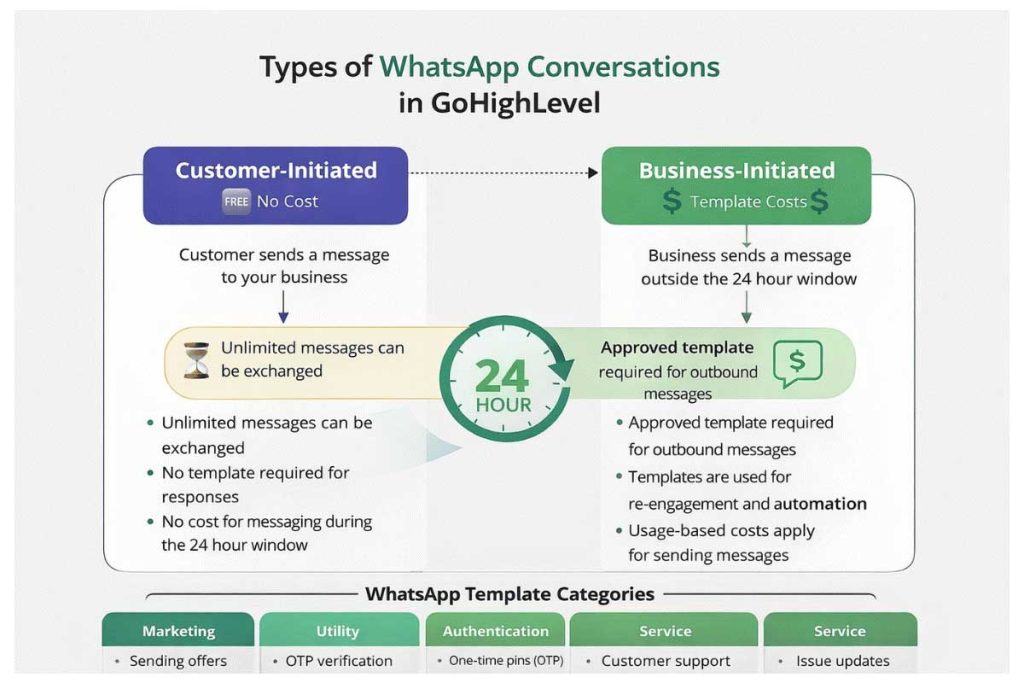
Important: While Meta supports Marketing, Utility, Authentication, and Service templates, inside GoHighLevel you can currently select only Marketing and Utility when submitting templates.
What WhatsApp Templates Are
WhatsApp templates are messages you create and submit to Meta for approval before using them outside the 24-hour conversation window.
They are used when a business wants to:
• Start a new WhatsApp conversation
• Message a contact after 24 hours of inactivity
• Send automated outbound messages
Once approved, templates can be reused and personalized with contact information.
When Templates Are Required
Templates are required when:
• A business sends the first message
• Messaging happens outside the 24 hour reply window
• Messages are sent through automation or bulk actions
Templates are NOT required when:
• A customer messages first
• Replies occur within the 24 hour window
• Conversations are active and two way
Most customer support and booking conversations do not require templates.
The 24 Hour Rule with WhatsApp Explained

The GoHighLevel WhatsApp integration follows WhatsApp’s official messaging rules, including what is commonly referred to as the 24 hour rule.
WhatsApp requires all businesses using the WhatsApp Business Platform to respond to customer initiated messages within 24 hours. When a customer sends a message to your business on WhatsApp, a 24 hour conversation window opens.
During this 24 hour window:
• You can exchange unlimited messages with the customer
• Messages do not require templates
• No outbound messaging fees apply for replies
This window is designed to support real time, two way conversations between businesses and customers.
Once the 24 hour window closes, WhatsApp restricts outbound messaging. You can still contact the customer, but only by using pre approved message templates. These templates must be approved by WhatsApp and typically incur a usage based cost.
Important: The 24-hour window resets every time the customer replies. Each new inbound message restarts the clock, meaning an active conversation can remain open indefinitely as long as the customer continues responding within 24 hours.
In practical terms:
• Inbound customer messages open a free conversation window
• Replies within 24 hours are unrestricted
• Messages sent after 24 hours must use templates
This rule applies globally and is enforced by WhatsApp, not GoHighLevel. The GoHighLevel WhatsApp integration is built to follow this requirement automatically.
For most businesses, this means:
• Customer support conversations are usually free
• Booking and sales conversations remain open as long as customers respond
• Templates are mainly needed for follow ups, re engagement, and outbound messaging
Understanding the 24 hour rule is essential when planning WhatsApp workflows, automation, and messaging strategy inside GoHighLevel.
Automation and WhatsApp Flows
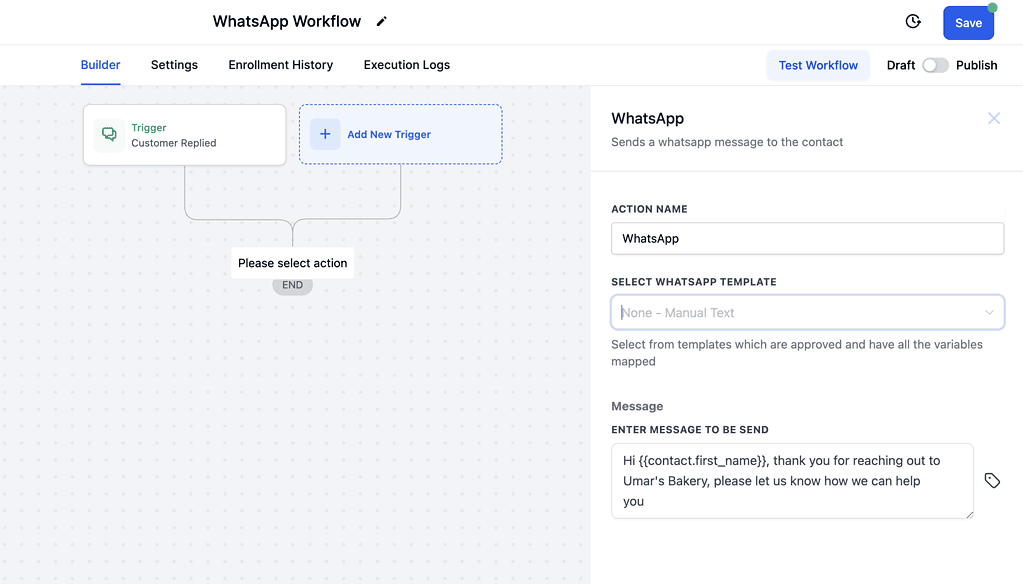
The GoHighLevel WhatsApp integration works with workflows and automation.
Businesses can:
• Send automated replies
• Trigger messages based on actions
• Combine WhatsApp with email and SMS
• Use WhatsApp Flows for in chat scheduling
WhatsApp Flows allow customers to complete actions such as booking appointments directly inside WhatsApp without opening external links. This approach works well in mobile first environments.
Understanding Message Templates
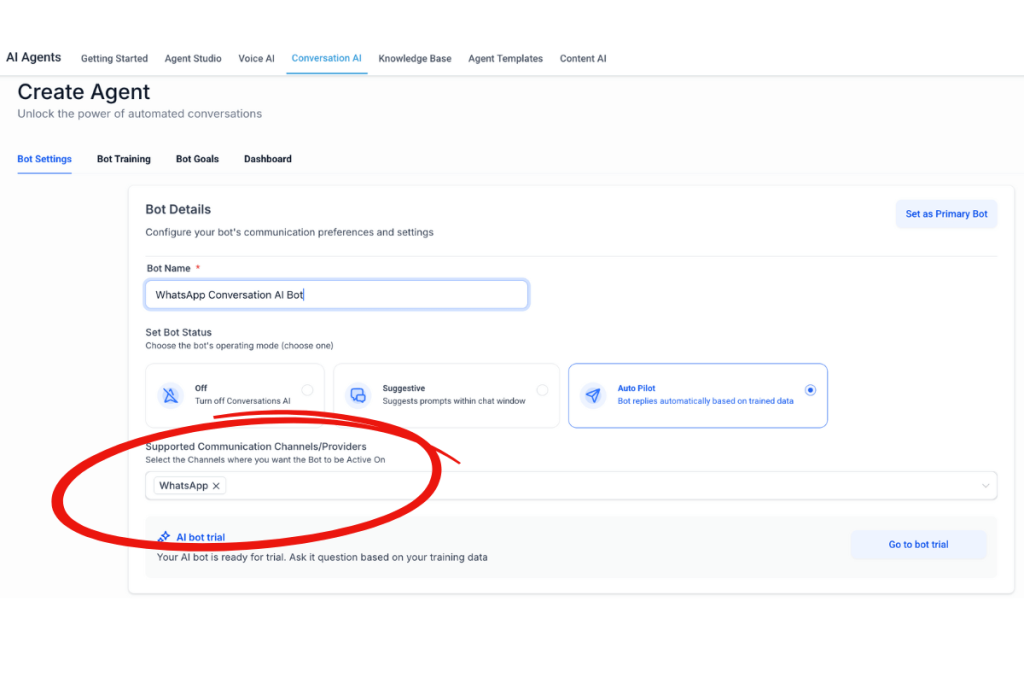
The GoHighLevel WhatsApp integration can be used with Conversation AI to respond automatically to incoming WhatsApp messages.
When a customer sends a message on WhatsApp, GoHighLevel can:
• Detect the inbound message
• Route the conversation through workflows
• Trigger Conversation AI to generate a reply
• Continue the conversation until a handoff is needed
This allows businesses to provide immediate responses on WhatsApp without requiring a team member to be available at all times.
How Conversation AI Is Commonly Used on WhatsApp
Businesses use Conversation AI with WhatsApp for:
• Answering common questions
• Handling initial lead inquiries
• Handling initial lead inquiries
• Routing conversations to the right team or pipeline
• Providing responses outside business hours
Because WhatsApp is often used for real time communication, fast replies matter. Conversation AI helps ensure that inbound messages receive a response even when staff are unavailable.
How This Works With the 24 Hour Rule
Conversation AI replies sent within the 24 hour customer service window:
• Do not require templates
• Do not incur outbound messaging fees
• Follow WhatsApp’s standard rules automatically
This makes AI assisted replies especially useful for inbound WhatsApp conversations, where customers initiate contact.
Human Handoff Remains in Place
Conversation AI does not replace human interaction entirely. Businesses can configure workflows so that:
• AI responds first
• Conversations are handed to a team member when needed
• Messages remain visible in the shared inbox
This allows teams to balance automation with direct communication.
Pricing and Requirements

To use the GoHighLevel WhatsApp integration, a GoHighLevel account is required. WhatsApp is not available as a standalone product.
Pricing includes:
1. A GoHighLevel subscription
2. A monthly WhatsApp enablement fee per sub account
3. Usage based fees for outbound template messages
Inbound messages and replies within the 24 hour window are free. Usage costs apply mainly to outbound template messages and vary by country. In many regions, WhatsApp is less expensive than SMS.

Agencies can rebill WhatsApp costs to clients and set their own pricing.
Alternative WhatsApp Integrations for GoHighLevel
While the native GoHighLevel WhatsApp integration covers the needs of most businesses, some teams look for additional capabilities depending on volume, automation requirements, or AI usage. In these cases, third party integrations built specifically for GoHighLevel may be considered.
Three commonly referenced options are AppLevel, Wazzap, and my CRMSIM.
AppLevel – A Premium WhatsApp Integration for GoHighLevel

AppLevel is a third party WhatsApp integration designed to work directly with GoHighLevel. It is often used by businesses and agencies that want to extend WhatsApp functionality beyond the native integration, particularly when conversational AI and large scale messaging are required.
AppLevel integrates AI driven chat capabilities into WhatsApp conversations, allowing automated responses to customer inquiries based on intent and context. This can be useful for lead qualification, support routing, and after hours responses.
Key characteristics of AppLevel include:
• AI based WhatsApp chat handling
• Automated conversations tied to GoHighLevel workflows
• Support for mass messaging
• Direct integration with the GoHighLevel environment
Because AppLevel uses a flat subscription model rather than usage based message pricing, it may be considered by businesses that send a high volume of WhatsApp messages and want predictable costs.
AppLevel is typically evaluated by agencies or businesses that require advanced automation or AI assisted messaging on WhatsApp.
Wazzap – An Alternative WhatsApp Integration for GoHighLevel
Wazzap is another third party WhatsApp integration that connects WhatsApp numbers to GoHighLevel using a QR code based setup process. It was developed by a team based in Mexico and is commonly used in Latin American markets.
Wazzap focuses on providing WhatsApp messaging inside GoHighLevel without per message usage fees. Businesses connect an existing WhatsApp number and can send messages without template restrictions.
Common use cases for Wazzap include:
• Automated WhatsApp conversations
• Appointment reminders
• Voice notes
• Internal staff notifications through WhatsApp
Because Wazzap operates outside the official WhatsApp Business API model, businesses should evaluate suitability based on their region, messaging volume, and risk tolerance.
Wazzap is typically considered by businesses that prioritize unlimited messaging and fast setup over official API based compliance.
To explore this integration further, start your free trial and learn more here.
myCRMSIM – WhatsApp Messaging With SMS Backup
myCRMSIM provides a WhatsApp integration that can be used alongside GoHighLevel for businesses that want flexible message delivery rather than a fully conversational WhatsApp channel.
A key feature of myCRMSIM is its ability to send messages using:
• WhatsApp only
• WhatsApp with SMS fallback
• SMS when WhatsApp delivery is not possible
This approach helps ensure messages are delivered in situations where WhatsApp is unavailable or not actively used by a contact.
myCRMSIM is commonly used for notifications, reminders, and time sensitive messages where delivery reliability matters more than ongoing conversation flow.
Unlike the native GoHighLevel WhatsApp integration, myCRMSIM does not replace the WhatsApp conversation inbox. It is typically evaluated as a complementary messaging option rather than a conversational automation solution.
Choosing Between Native and Third Party WhatsApp Integrations
For most businesses, the native GoHighLevel WhatsApp integration provides sufficient functionality, especially when combined with workflows, templates, and WhatsApp Coexistence.
Third party integrations such as AppLevel, Wazzap, or myCRMSIM may be evaluated when:
• Advanced AI chat handling is required
• Message volume is extremely high
• Predictable flat pricing is preferred
• Specific regional workflows are needed
Each option serves a different type of business, and the best choice depends on scale, automation requirements, and compliance preferences.
Why This Matters When Evaluating GoHighLevel in 2026
For businesses serving international markets, WhatsApp support is no longer optional.
GoHighLevel provides:
• Native WhatsApp inside the CRM
• Support for multilingual messaging
• Automation and workflows
• A shared inbox for teams
• Compatibility with the WhatsApp Business App
This reduces the need for separate tools and supports consistent communication across regions.
Getting Started With GoHighLevel

If you want to explore the GoHighLevel WhatsApp integration in your own environment, you will need a GoHighLevel account.
GHL Central offers a 30 day free trial of GoHighLevel, along with additional bonuses to help new users get started.
Frequently Asked Questions
Does GoHighLevel support WhatsApp internationally?
Yes. GoHighLevel supports WhatsApp in most countries where WhatsApp Business is available.
Do I need GoHighLevel to use WhatsApp?
Yes. The native WhatsApp integration works only inside GoHighLevel.
Are WhatsApp messages free?
Inbound messages and replies within 24 hours are free. Outbound template messages have usage based costs.
Can I keep using the WhatsApp Business App?
Yes. WhatsApp Coexistence allows the same number to be used in both the app and GoHighLevel.
Are templates required for every message?
No. Templates are required only for outbound messages or messages sent outside the 24 hour window.
Recent Articles from GHL Central:

Gary Vee Confirmed as Keynote Speaker at GoHighLevel LevelUp Summit 2026
Gary Vaynerchuk is a confirmed keynote speaker for the GoHighLevel LevelUp Summit 2026 in Dallas, adding one of the most recognizable names in entrepreneurship, marketing,

GoHighLevel LevelUp Summit 2026: Dates, Speakers, Tickets & Complete Guide
UPDATED SEPTEMBER 10, 2026: HighLevel has officially announced Gary Vaynerchuk (Gary Vee) as a keynote speaker for the GoHighLevel LevelUp Summit 2026. HighLevel is also

GoHighLevel Asia Pacific: How AI Is Changing Business and Agencies
GoHighLevel Asia Pacific is becoming a bigger part of HighLevel’s global growth story, with increasing attention on markets including Australia, the Philippines, Singapore, Malaysia, Indonesia

HighLevel LIVE Manila Recap 2026: Highlights, Speakers & Key Takeaways
This HighLevel LIVE Manila recap looks back at HighLevel’s biggest event ever, where more than 2,000 agency owners, marketers, entrepreneurs, and automation specialists gathered in

Nicholas Papp: Helping Entrepreneurs Grow with GoHighLevel, AI, and Community
If you’ve attended a HighLevel event, watched a GoHighLevel tutorial, or followed the community online, there’s a good chance you’ve come across Nicholas Papp. Most
HighLevel LIVE Manila 2026: Why the Philippines Is Becoming an APAC HighLevel Hub
For years, the HighLevel movement across Asia-Pacific has been growing quietly behind the scenes. Small meetups. Small Zoom calls. Small communities of agency owners, freelancers,
